Viruxa Studio Download
New Your AI assistant can run it — MCP & API See how →

Find the flaw
before somebody else does.

Viruxa Studio finds the bugs, leaked keys, vulnerable packages and insecure code in what you own — in forty-one languages, entirely on your own machine — then watches for the attack and refuses it at the door.

Windows, macOS, Linux No account to make Your source never leaves your machine One whole scan free
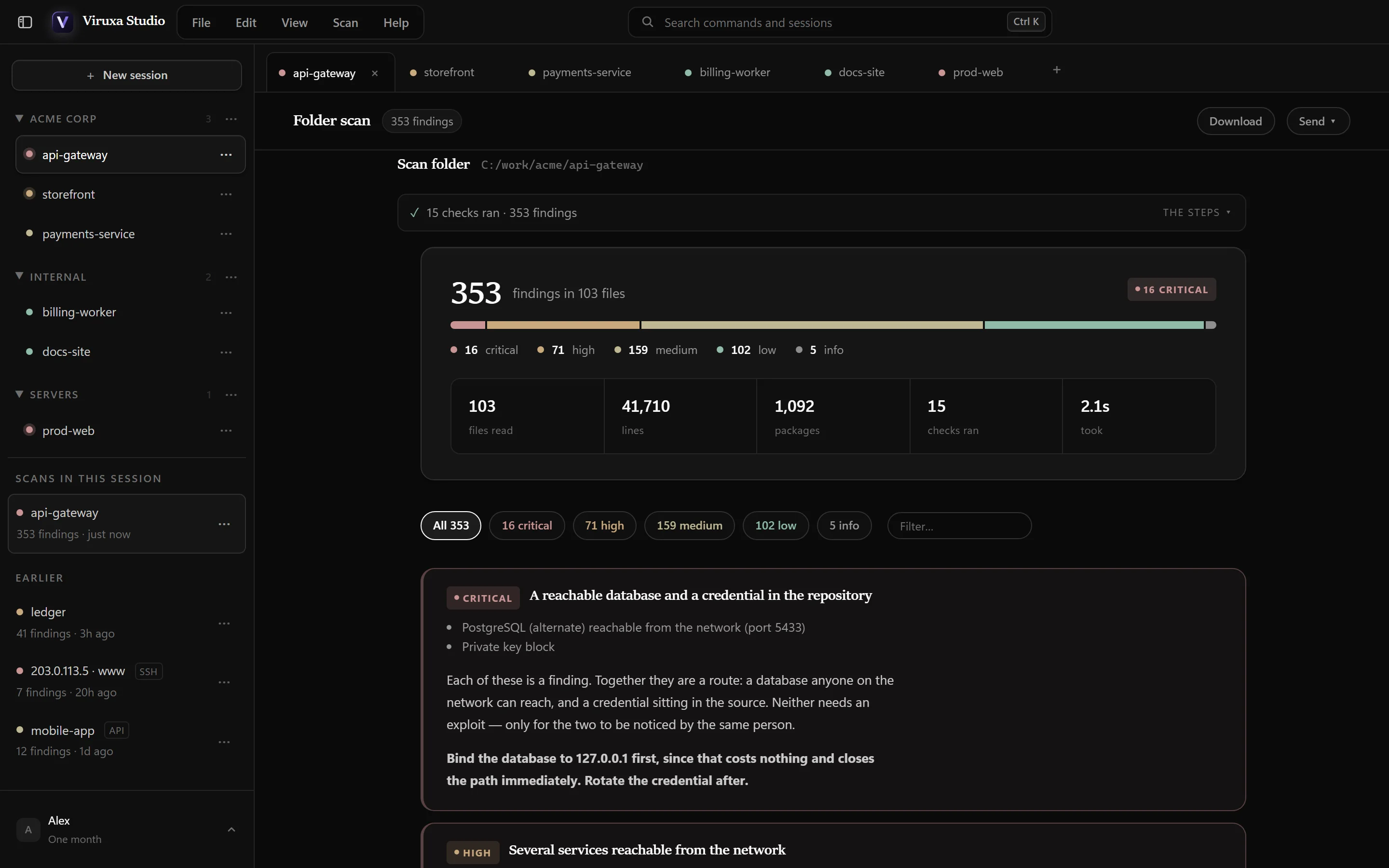
Viruxa Studio showing a finished scan: 353 findings in 103 files, 16 of them critical, with sessions grouped by client down the left.
100%
of the OWASP Benchmark's vulnerable cases found, with no false alarms
41
languages and template engines read for security flaws
67
languages checked for bugs, plus five data formats
0
runtime dependencies — Node's standard library, nothing else

How it works

Point it at your code. Fix what matters first.

No agent to install on a server, no account to create, no upload. It reads the code where it lives and tells you what is wrong, worst first.

Choose what to scan

A folder on this machine, a repository by its address, or a folder on a server over the SSH you already use.

Every check runs, here

Credentials, dependencies, code, bugs, containers, pipelines and infrastructure — twenty-six checks, one engine, in seconds.

Worst first, with the fix

Findings that combine into a real route are joined into one. Each says what to change — and some it can change for you.

Bugs & security

Every language. Every kind of flaw.

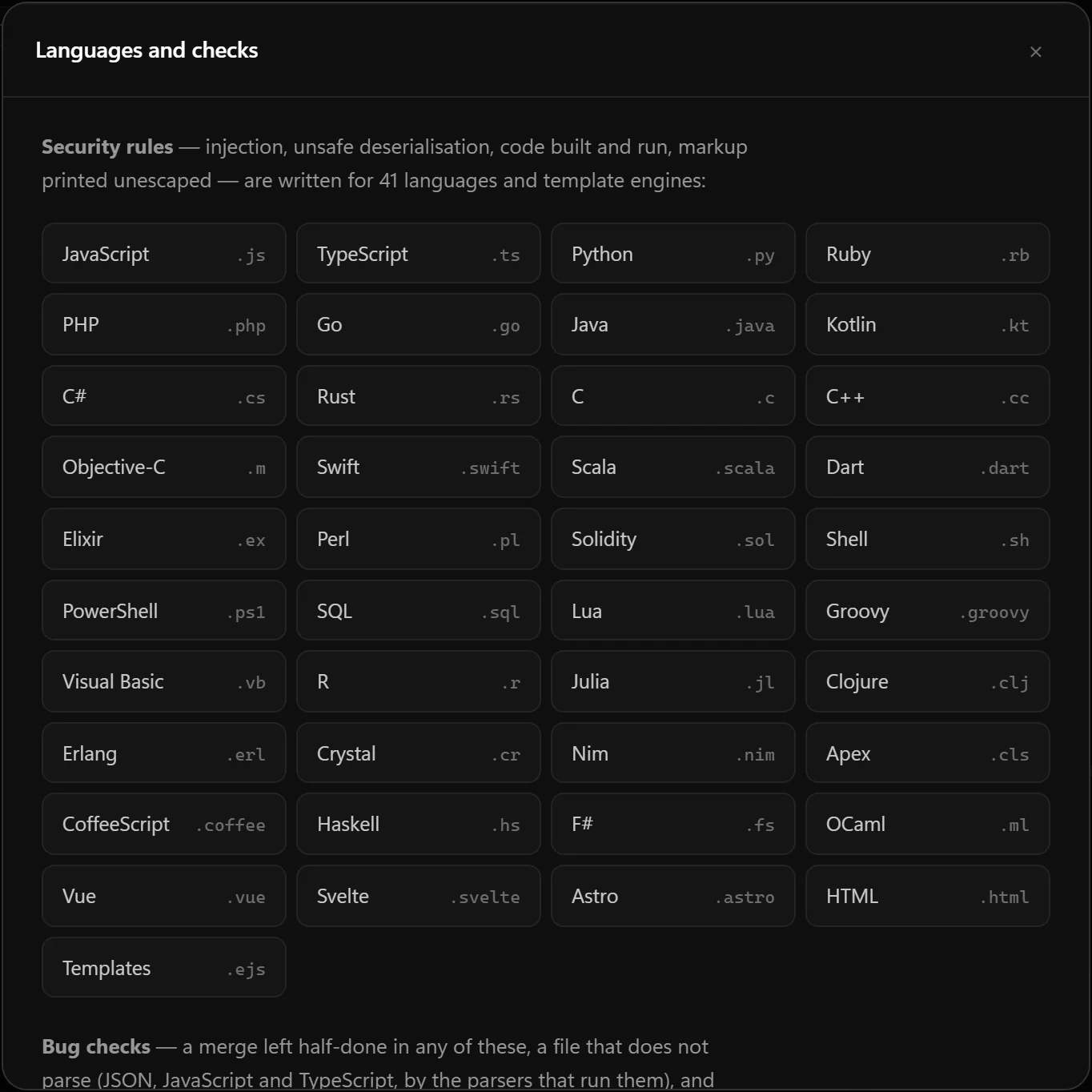
Security rules for forty-one languages and template engines, and bug checks for sixty-seven languages and five data formats — followed across files, not just matched on one line.

  • Injection and unsafe code — queries joined from strings, shell commands built from a request, markup printed unescaped.
  • Bugs that are not attacks — a merge left half-done, JSON that no longer parses, a value compared with itself, a loop counting the wrong way.
  • An optional second reader — a model on your machine, or any API you choose, reads for the mistakes no rule can name.
The Languages and checks sheet in Viruxa Studio, listing the languages its security rules read, from JavaScript and Python to Solidity, Vue and Svelte.

Monitoring

Finding it is the easy half.

A scanner reads a log and tells you what already happened. These stand in front and refuse, or watch the files, the log and the machine and say so the moment something changes.

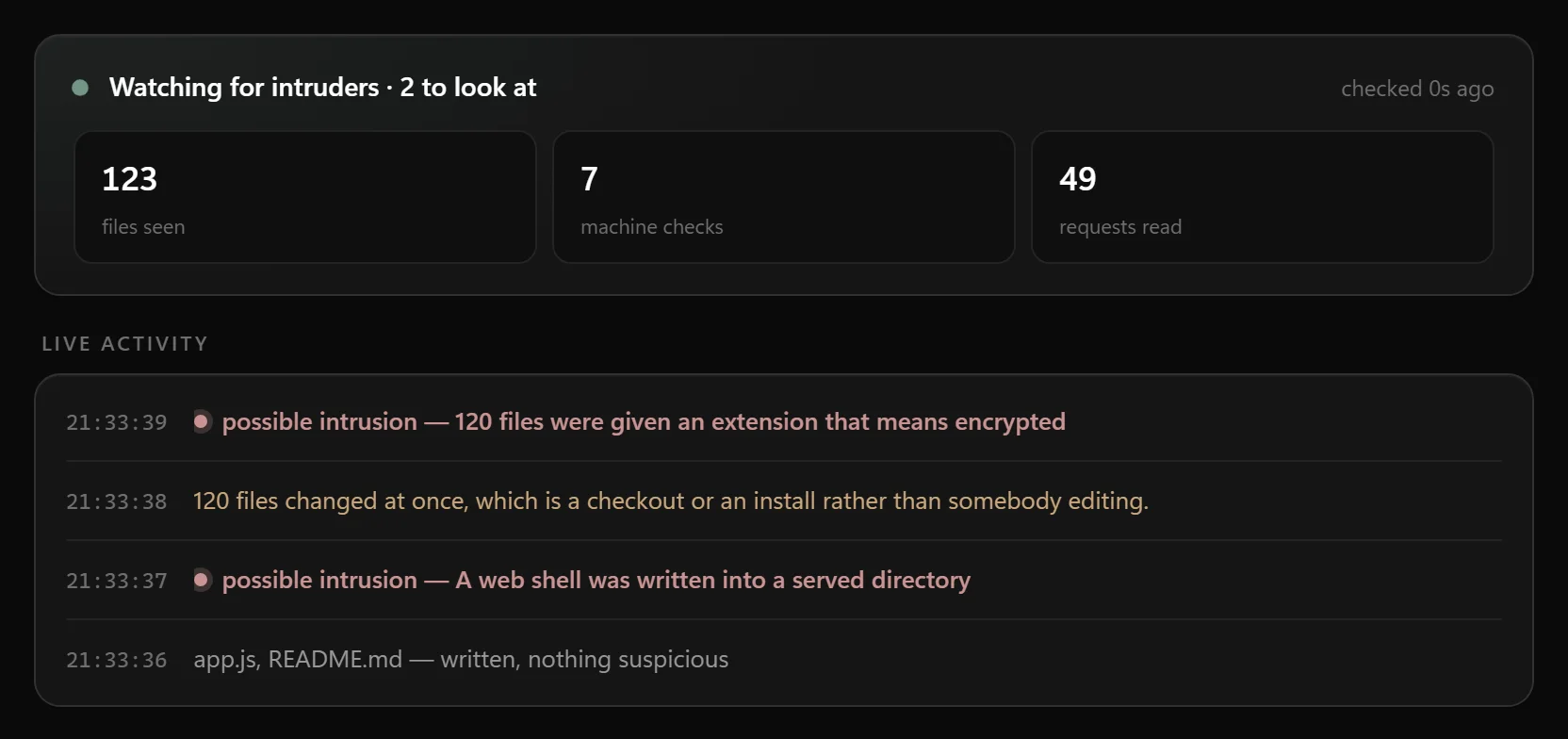
  • A web shell or a ransom note written into your files — caught as it is written.
  • A port that was not listening a minute ago, or a process running from somewhere a foothold writes.
  • Injection and password guessing in the access log, each with the address it came from.
Viruxa Studio watching a folder: a live feed showing a web shell and 120 encrypted files caught as possible intrusions, with counts of files seen, machine checks and requests read.

A guard in front of the thing being attacked

One process in front of your application, refusing attacks before they reach it — reading the URL, the headers and the body, where a login form's injection lives and where the whole attack surface of an LLM endpoint is.

viruxa.cmd shield --to=http://127.0.0.1:3000 --block

Measured against a running application: seventeen attacks sent through it — injection, traversal, Log4Shell in a header, the cloud metadata service, a prompt injection — and the application received none. Fourteen ordinary requests passed.

An agent firewall, at the three moments that matter

An agent is attacked through a document it was asked to summarise, a tool result it trusted, and a tool call it made because something told it to. So the questions are asked of arriving text, of a tool call before it runs, and of what is about to be sent.

It asks no model — a guard that costs an inference can be argued with by the very text it is inspecting.

The machine itself

A port that started listening, an outbound connection somewhere notable, a process running from somewhere a foothold has to write — asked of the operating system on a poll, reporting only what changed.

viruxa.cmd host --every=15

A poller, not a kernel agent, and it says so first. It never sends a packet and never stops anything.

API & MCP

Your AI assistant can run it, too.

Claude Desktop, Claude Code, Cursor, VS Code and Windsurf connect over MCP; anything else over a REST API on this machine. They list and read scans, search findings, check a file after an edit, and start a scan — under the same rules as you.

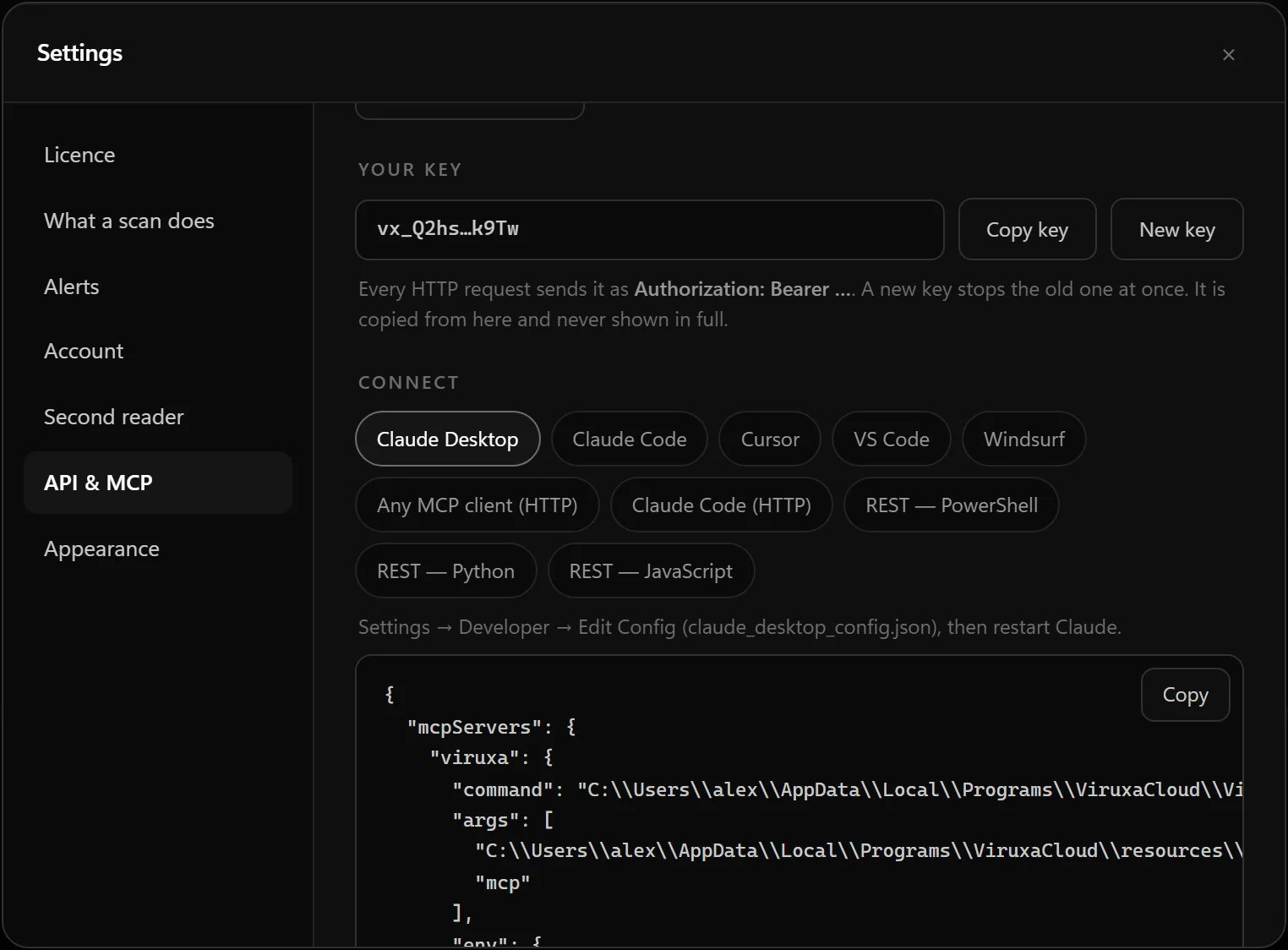
  • A ready-made snippet for each program, copied with one click — the key never shown in full.
  • This computer only, a key on every request, and requests from web pages refused.
  • Prompts built in — security review, fix the findings, audit a server — as slash commands in Claude Code.
Settings, API and MCP: the key shown as a hint with Copy and New key, and connection snippets for Claude Desktop, Claude Code, Cursor, VS Code, Windsurf, any MCP client and REST.

AI applications, over MCP

It starts Viruxa itself; no port, no key. Settings → API & MCP has the snippet for each.

Any program, over REST

An HTTP API on this machine only, described as OpenAPI, with a key on every request. Scripts, automation, your own dashboard.

Servers, over SSH

A folder on a server, read over the SSH you already use — your key or agent, never a password — scanned here, and the copy deleted.

Handing it over

Nine ways out

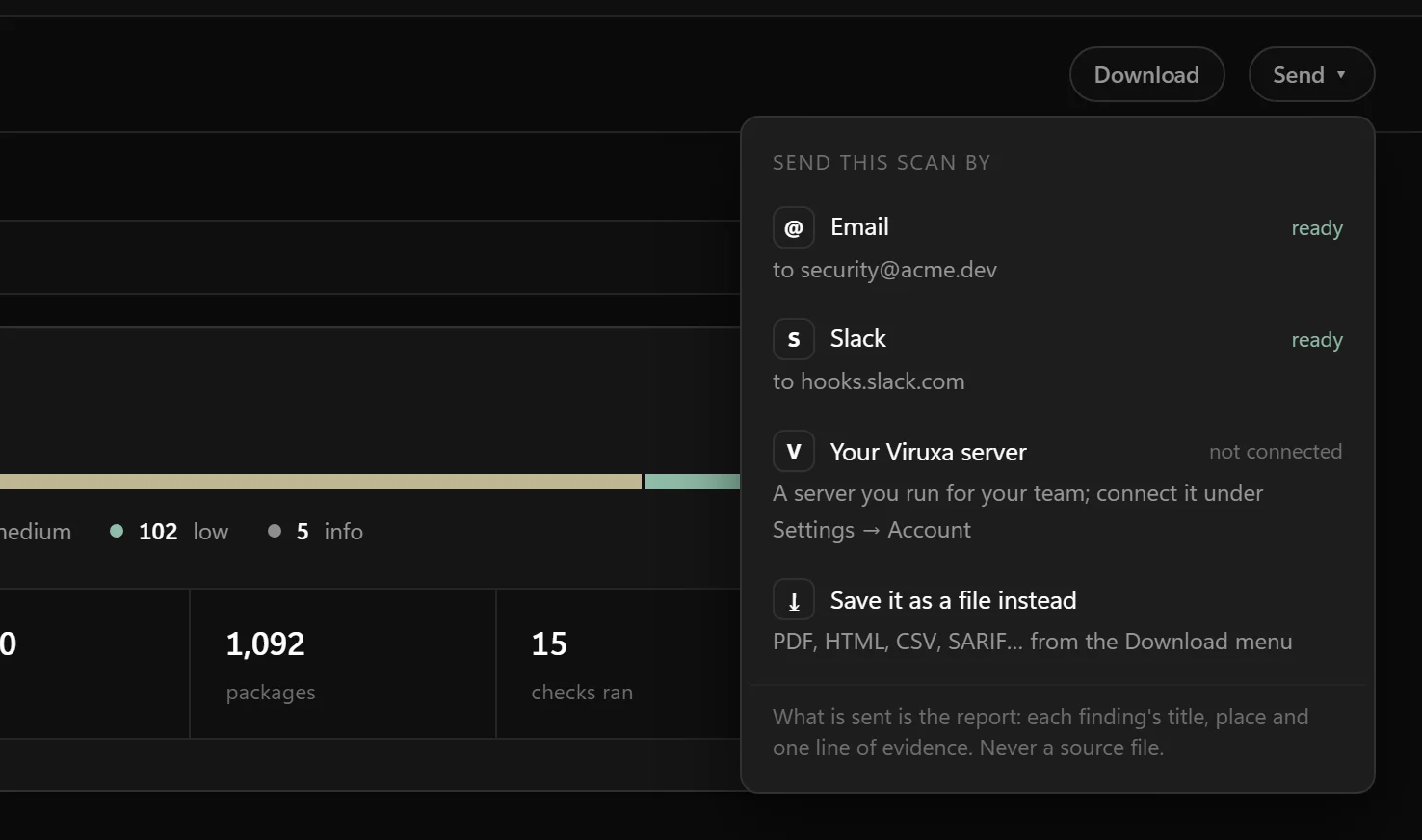
The question a scan actually ends on is "can you send me that". Send it by email with the report attached, to Slack, Discord or Teams, to WhatsApp or any webhook — or save it in the format the person asking needs.

PDF for an audit Web page for a colleague Markdown for a ticket Spreadsheet for the backlog JSON for a script SARIF for GitHub CycloneDX for procurement Control summary for SOC 2, PCI DSS, ISO 27001 Waivers for what was dismissed, and why
The Send menu over a finished scan: email to security@acme.dev, Slack, your Viruxa server and saving as a file, each saying where it goes.

Nothing carries the credential

Evidence is redacted where it is found, so a report identifies a finding without being the leak. No file content from the scanned project appears in any of them, ever.

Nothing runs

The PDF has no JavaScript and no embedded files. The web page has no script and no network. The spreadsheet defuses cells beginning =, because a security tool that ships a file Excel executes is the delivery mechanism rather than the warning.

Every finding carries a CWE and an OWASP category, so it means something to a code-scanning tool and to whoever is filling in the security questionnaire.

What it checks

Twenty-six scanners, one engine

The same engine answers the terminal, the window and the dashboard, so no two screens can disagree about the same scan.

Committed credentialsNinety-six patterns anchored to how each vendor writes its keys — AWS, Google, GitHub, Stripe, Slack, private keys, connection strings — graded by whether git is actually tracking the file.
Credentials in git historyThe key committed on Tuesday, deleted on Wednesday, never rotated — gone from the files and still in every clone.
Credentials with no vendorA credential-shaped name assigned a value with the randomness of a generated key — your own internal token.
Vulnerable dependenciesEvery installed package against OSV, across twenty lockfiles and manifests, re-ordered by what CISA and FIRST say is actually being exploited.
Supply chainInstall scripts that run before anybody reads them, names one character from a popular package, code trying not to be read.
CodeLine by line in forty-one languages and template engines — JavaScript to Lua, Groovy, Apex, Vue and Svelte, EJS, Jinja and Razor — followed across files.
BugsMistakes that are not attacks, in sixty-seven languages and five data formats: a merge committed with its conflict markers in, JSON or TypeScript that no longer parses — checked by the parsers that run them — and logic that cannot be what was meant: a value compared with itself, if (x = 0), a loop counting away from its bound. On Juliet's logic-error cases it finds 89.5% with no false alarms.
Second readerOptional and off until you switch it on: a model reads up to forty files a scan for the bugs no rule can name. On your own machine it sends nothing anywhere; with a hosted API, the window says where the files go before they are sent. Everything it reports is marked as a judgement.
AI toolingMCP servers that fetch and run whatever the registry serves today, agent rules files, and characters in them a reviewer cannot see.
Mobile applicationsCleartext traffic, backups anyone can pull, debuggable builds, components any app can call.
Devices and control systemsMQTT brokers, PLC protocols, firmware builds and bootloaders.
Containers and pipelinesUnpinned base images, credentials baked into layers, the Docker socket, workflows checking out a fork with secrets in scope.
InfrastructureTerraform and Kubernetes: ingress from anywhere graded by the port it opens, public buckets, privileged pods, Secrets carrying their values.
Listening ports and this machineThe socket table on all three platforms — never sending a packet — the Docker daemon, a kubeconfig, key files anybody can read.
Cloud accountsAWS, GCP, Azure, DigitalOcean, Cloudflare, Kubernetes, Oracle and Alibaba — read-only, with credentials already on this machine, plus the audit trail for an attack in progress.
Repository settingsBranch protection, what a workflow may do, deploy keys — asked of GitHub, because no file in the repository holds them.
A live siteCertificate expiry, TLS version, security headers, cookie flags, CORS, and a fixed list of files that should never be served. Refuses to run until you have proved the host is yours.
Proof

Measured, not claimed.

What matters is what the rules find in code written to test them — and what they report in code that is safe, because a scanner that cries wolf is switched off within a month.

100%

OWASP Benchmark

2,740 Java test cases. All 1,415 vulnerable ones found; none of the 1,325 safe ones reported.

100%

NIST Juliet, Java

Sixteen web weaknesses, sampled evenly across every flow variant. Every flawed method found; 1.4–1.6% of clean ones reported.

96%

Semgrep's own rule tests

106 of 110 of the cases Semgrep writes for its security rules, and no false alarms. 89.7% counting its audit rules.

27%

NIST Juliet, C and C++

Still the weak one, and said so. Use after free 59% and double free 31%, format strings 53%, all with no false alarms. Buffer overflows need a compiler's model of memory: 3%.

The part that changes the conversation

Is the key you found still live?

Most scanners tell you something looks like an AWS key. Ask for --verify and this one asks the vendor. A repository with three hundred findings and four working keys is four problems — and everything else can wait until Monday.

Live

The vendor accepted it just now. Not a finding — an incident, and the first thing in the report.

Revoked

Refused. Still worth fixing the habit that put it there, and no longer worth waking anybody up for.

Not checked

No verifier for that vendor, or the network was down. Said out loud, because a key wrongly reported as dead is the most dangerous thing a scanner can print.

It is off unless you ask for it, and it always will be. Each key is offered to exactly one host, named in the source, over https, with redirects refused.

In your pipeline

Findings on the pull request that caused them

Write the scan as SARIF and GitHub puts every finding inline, next to the line it is about. Two steps, from the Linux download on the runner:

- run: ./viruxa . --format=sarif --out=viruxa.sarif
  # exits 1 on anything critical or high — the gate

- uses: github/codeql-action/upload-sarif@v3
  if: always()
  with:
    sarif_file: viruxa.sarif

--baseline gates on what the pull request introduced rather than on the backlog it inherited.

From a terminal

The command line is in the download

Beside the app in every zip: viruxa.cmd on Windows, ./viruxa on macOS and Linux — the app's own runtime, nothing else to install.

# scan this project
viruxa.cmd .

# a repository somewhere else — cloned, scanned, deleted
viruxa.cmd repo owner/app --history

# a folder on a server — over your own SSH
viruxa.cmd ssh [email protected]:/var/www --port=22

# a PDF for the audit and a spreadsheet for the backlog
viruxa.cmd . --format=pdf,csv

# let an AI application use it, over MCP
viruxa.cmd mcp

# keep scanning after the terminal closes
viruxa.cmd service install . --every=60

It exits 1 when anything critical or high is open. viruxa.cmd help lists the rest.

Alerting and teams

Thirty milliseconds, then silence.

The first sighting of anything serious goes out at once — 29ms from the guard refusing a real request to a webhook receiving it — and the rest of the minute is collapsed into one message. A flood of two thousand becomes one.

Webhook

Signed with the same scheme the server uses — and Slack, Discord, Teams and Google Chat get messages written for them.

Email

Through your own relay. Spoken directly — no mail library, no dependency tree.

WhatsApp

Through the Cloud API, with the approved template a 3am alert actually needs.

A server you run, not one you rent

A dashboard, a scheduler that rescans while nobody is watching, and notifications that only ever tell you what is new. It stores findings, never source.

Teams

Owners, members and viewers. Invitations are codes rather than emails, because a security tool with a mail server is a security tool with an SMTP credential to protect.

Trend

Every scan ever run, counted by severity. "Is this getting better" is the question a security programme is judged on.

Two rules this holds itself to

Built like the tool it wants you to trust.

Only what you own

Nothing here can be pointed at somebody else's system. The file scanners read a directory; the port inventory reads this machine's own socket table and never sends a packet. The site audit refuses to run until control of the host has been proved by DNS record, a file, or a response header.

No dependencies

A security tool with four hundred transitive packages is its own attack surface. The scanner, the API, the database layer, the dashboard, the PDF writer and the zip writer are all Node's standard library.

And one thing it will not claim: a scan that found nothing has checked what it knows how to check. That is not the same as there being nothing there, and every report says so.

Pricing

Every scan is a whole scan.

The free scan shows every finding it has, not a sample. Pay once — nothing renews by itself. Prices in Indian rupees, through Razorpay. Terms · Refunds · Delivery

Free

₹0

to see what it finds

  • One whole scan, every check
  • Every finding, nothing withheld
  • One project at a time
Download

One day

₹99

once — not a subscription

  • Everything in Free, for 24 hours
  • Unlimited scans
  • One project at a time
Buy one day

Three months

₹2,499

84 days — saves 5% against monthly

  • Everything in One month
  • 3 at a time
  • Three four-week months
Buy three months

Enterprise

₹7,999

28 days — a four-week month

  • Everything, with no limit
  • Unlimited projects, clouds and monitors
  • Scheduled background scans
  • Team workspaces and roles
Buy enterprise

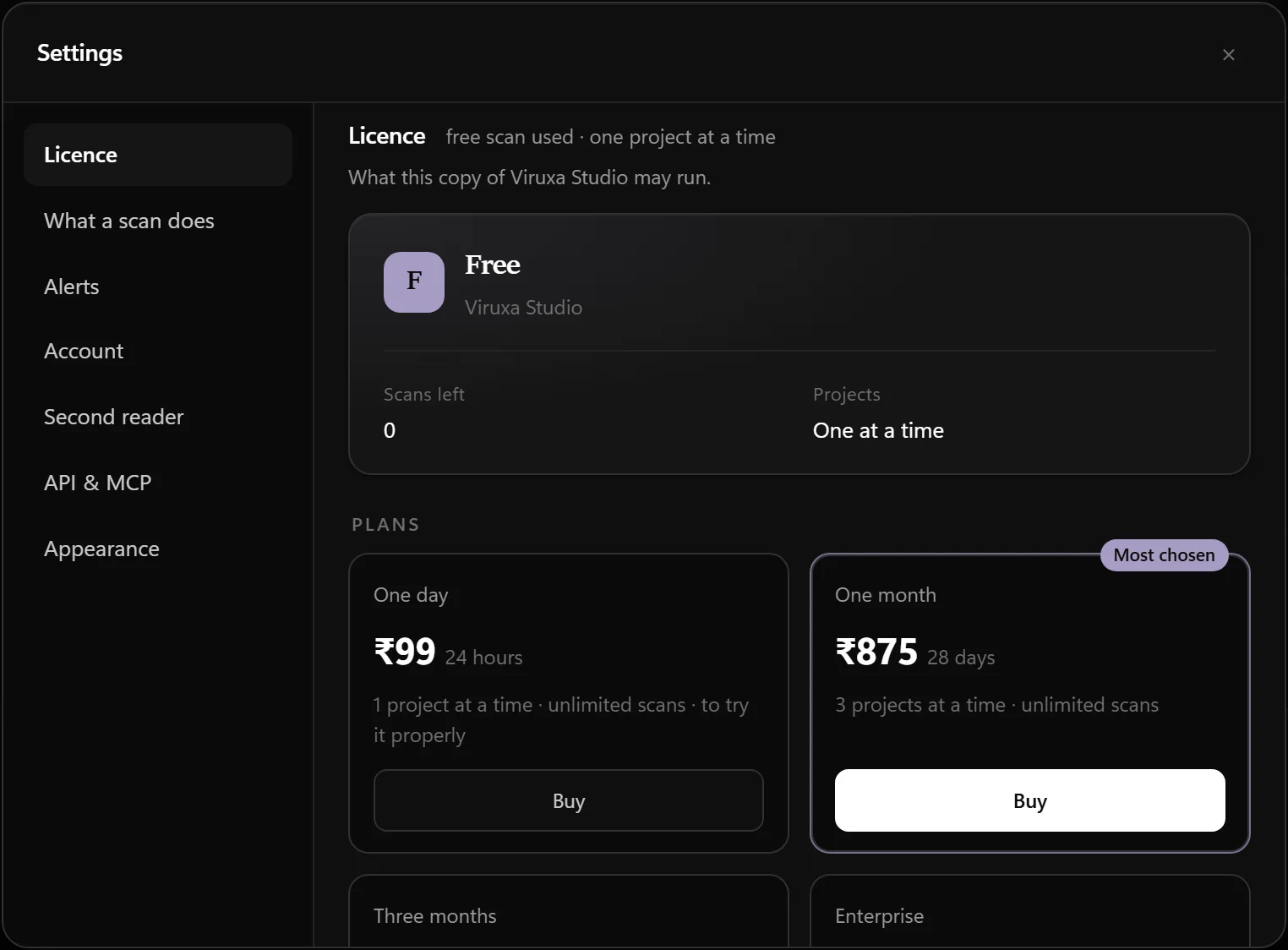
Buy, renew or switch plan inside the app, and it activates itself. Settings → Licence → pick a plan: Razorpay's page opens in a window of the app's own, and the moment the payment is confirmed the licence installs — no account, no key to copy. Renewing early never costs days; what is left is added on. Bought on this site instead? One click on "Open in Viruxa Studio" after payment hands it to the app.

The plans inside Viruxa Studio: One day, One month (most chosen), Three months and Enterprise, each with a Buy button.

A licence is a signed key checked on your own machine. Nothing is sent anywhere and it works on a disconnected network — so every key is signed to a name, and that name appears on every scan and in every report.

Download

Get the desktop app.

Nothing is installed. Unzip it, run it, point it at a folder, a repository or a server. It reads the code where it lives.

These builds are not code-signed. Your operating system will warn you the first time, and that warning is doing its job — an unsigned program is one nobody has vouched for. Every release publishes SHA-256 checksums so you can confirm the file you downloaded is the file that was built.
Every release is also signed. A checksum sitting next to a download can be replaced along with it; the release manifest cannot, because it is signed with a key that never touches this download host. If you already have Viruxa Studio, check a new download before opening it: viruxa.cmd update --verify=ViruxaCloud-windows-x64.zip (./viruxa on macOS and Linux). It says Genuine or tells you not to run it.

Questions

Asked, and answered plainly.

Does my code leave my machine?

No. Scanning happens on your machine and works with the network unplugged. A default scan asks public advisory databases about your installed packages — names and versions only — and you can switch that off. The only thing that can send code anywhere is the optional second reader, which is off until you choose it and says where the files go before sending them.

Do I need an account?

No. There is nothing to sign up for. The app is the account: a licence is a signed key checked on your own machine.

I paid — how does the licence get into the app?

Buy from inside the app (Settings → Licence, then a plan): you pay on Razorpay's page in a window of the app's own, and the licence installs itself the moment the payment is confirmed — even if you closed that window, or paid by UPI on your phone. Bought on this site instead, press "Open in Viruxa Studio" after paying and the app installs it once you confirm; the key is shown too, for another machine. Renewing early adds to the end of the licence you have, and nothing renews by itself.

Which languages does it read?

Security rules cover forty-one languages and template engines, from JavaScript, Python, Java, Go and C to Solidity, Vue, Svelte, Jinja and Razor. Bug checks cover sixty-seven languages and five data formats. Help → Languages and checks in the app lists every one.

Can Claude, Cursor or another AI assistant use it?

Yes — over MCP, with a ready-made snippet for each under Settings → API & MCP. Any other program can use the REST API on the same machine, with a key on every request.

Why does my computer warn me when I open it?

Because the builds are not code-signed yet, and the warning is telling the truth. Check the download against the published checksums, or with the signed release manifest from a copy you already trust.

Start in a minute

One whole scan, free.

Every finding, nothing withheld. If it finds nothing, it will tell you what it checked — and that a clean result is not the same as a proof.